First Java Program || Hello World Example
- In this section, we will learn how to write the simple program of Java. We can write a simple hello Java program easily after installing the JDK.
- To create a simple Java program, you need to create a class that contains the main method. Let's understand the requirement first.
The requirement for Java Hello World Example
For executing any Java program, the following software or application must be properly installed.
- Install the JDK if you don't have installed it, download the JDK and install it.
- Set path of the jdk/bin directory. Click Here to learn how to set path JDK
- Create the Java program
- Compile and run the Java program
Creating Hello World Example
Let's create the hello java program:
class Simple{
public static void main(String args[]){
System.out.println("Hello GraspJava");
}
}
Save the above file as Simple.java.
To compile: javac Simple.java
To execute: java Simple
output:
Hello GraspJava
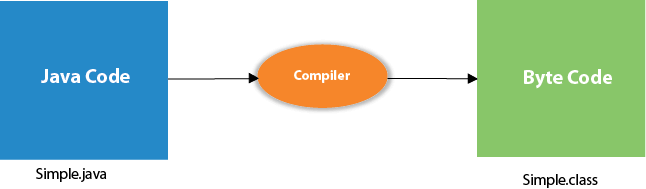
Compilation Flow:
When we compile Java program using javac tool, the Java compiler converts the source code into byte code.
Parameters used in First Java Program
Let's see what is the meaning of class, public, static, void, main, String[], System.out.println().
- class keyword is used to declare a class in Java.
- public keyword is an access modifier that represents visibility. It means it is visible to all.
- static is a keyword. If we declare any method as static, it is known as the static method. The core advantage of the static method is that there is no need to create an object to invoke the static method. The main() method is executed by the JVM, so it doesn't require creating an object to invoke the main() method. So, it saves memory.
- void is the return type of the method. It means it doesn't return any value.
- main represents the starting point of the program.
- String[] args or String args[] is used for command line argument. We will discuss it in coming section.
- System.out.println() is used to print statement. Here, System is a class, out is an object of the PrintStream class, println() is a method of the PrintStream class. We will discuss the internal working of System.out.println() statement in the coming section